Key Splitting
This page describes the security aspects of the key-splitting procedure. It focuses on the core functions in the ssv-keys library of the SSV-SDK, which is used to split validator keys.
Flow Overview
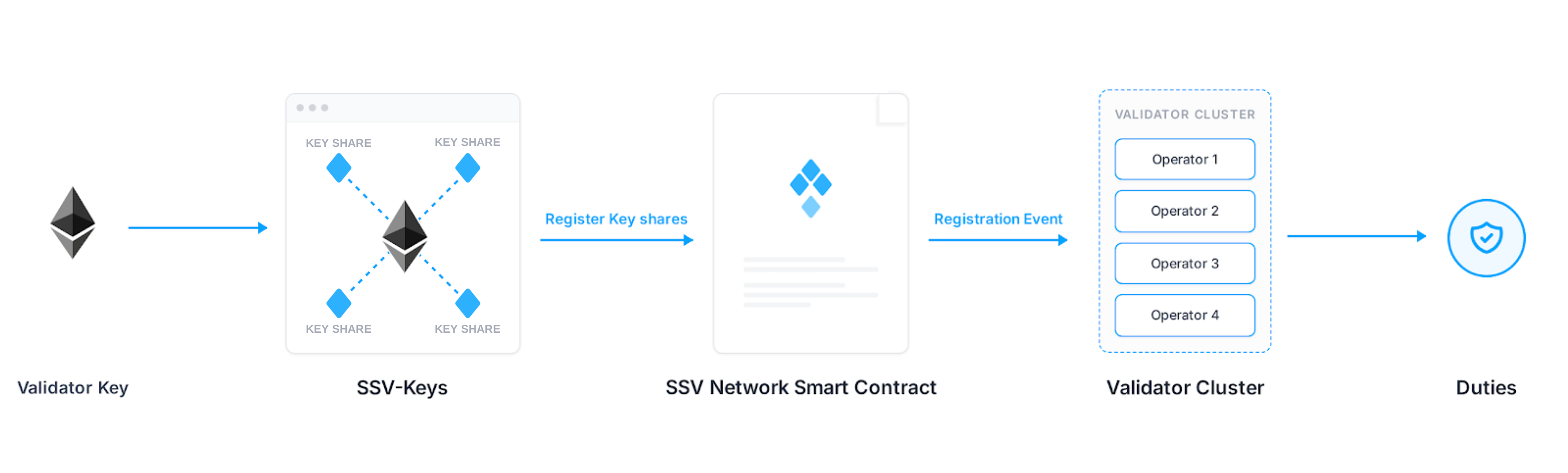
The whole flow can be described in 4 steps:
- Prepare
keystore-mfiles and their respective password(s). - Split the keys into
keyshares-*.json(the payload ready for registration). - Register the key shares to SSV Network via a Smart Contract interaction.
- SSV Nodes fetch registration events and start performing duties for a new validator as a cluster.
Security
A couple of important points to understand about the security of the key splitting procedure:
- SSV-SDK defines the logic of key splitting procedure, described in detail in Code Overview.
- Key splitting can (and should) be done on an offline machine, ensuring the data is not transmitted elsewhere.
- Private keys are loaded in RAM and decrypted, they are not logged or stored anywhere.
- Key shares, the product of key splitting, are then broadcast to the network during the validator registration process, through the event emitted by the smart contract.
- You can find the structure of
keyshares.jsonexplained on this page. - Operator nodes fetch smart contract events and extract encrypted key shares from them.
- Each share can only be decrypted by the operator's private key. So although everything is broadcast publicly, it is impossible to reconstruct the full key from events alone.
- Old keyshares remain valid. Take this into consideration when splitting a key more than once.
Example scenario: a key split across 4 operators, then split again to 1 old and 3 new operators. If the 3 operators that were left out are malicious, technically they can conspire and reconstruct the key.
Code Overview
Before diving into code details, here is a short description of processes that are happening during key splitting:
SSV-SDK reads an Ethereum validator keystore (EIP-2335), decrypts it in RAM using the password. The validator private key is then split into shares using Shamir Secret Sharing, each share is then encrypted with the corresponding operator’s public key, and finally a JSON payload is built, all of this happening on the local machine. The payload (written to keyshares-*.json) is ready for on‑chain registration.
The SSV-SDK is a TypeScript library that helps developers build on SSV Network. ssv-keys is the SSV-SDK library responsible for generating key shares. It relies mostly on the well-known and trusted bls-eth-wasm library.
We’ll review 4 functions and 1 class that are the most important for this process. Their respective GitHub files are linked in their names. Below are the key points to learn:
extractKeys
- Keystore decryption (
extractKeys) - The validator keystore is read from disk and decrypted in memory using the provided password, via theEthereumKeyStoreclass defined here. - Both the keystore data and password only exist in RAM during execution. The validator’s private key is never written to disk or transmitted externally.
- BLS imported from
bls-eth-wasm, it is used to deserialize the private key.
import bls from 'bls-eth-wasm';

// ...

// Extract private key from keystore data using keystore password.
// Generally can be used in browsers when the keystore data has been provided by browser.
// @param data
// @param password
async extractKeys(data: string, password: string): Promise<ExtractedKeys> {
  const privateKey = await new EthereumKeyStore(data).getPrivateKey(password);
  if (!bls.deserializeHexStrToSecretKey) {
    await bls.init(bls.BLS12_381);
  }
  return {
    privateKey: `0x${privateKey}`,
    publicKey: `0x${bls.deserializeHexStrToSecretKey(privateKey).getPublicKey().serializeToHexStr()}`
  };
}
buildShares
- Key splitting (
buildShares) - The decrypted private key is locally split into shares using Shamir Secret Sharing (SSS). Each share is then encrypted with the corresponding operator’s public key, ensuring that only that operator can recover its own share. encryptSharesencrypts shares with the provided operators’ keys, described in detail below.getThresholddepends on the number of operators in the cluster, also described below.
// Build shares from private key, operators list
// @param privateKey
// @param operators
async buildShares(privateKey: string, operators: IOperator[]): Promise<IEncryptShare[]> {
  const threshold = await this.createThreshold(privateKey, operators);
  return this.encryptShares(operators, threshold.shares);
}
encryptShares
- Is called within the
buildSharesfunction. - Creates a list of operators, decodes their public keys to base64, then calls the
Encryptionfunction to encrypt shares. Encryptionfunction loops through the list of operators and encrypts shares using each operator's public key. So that only a particular operator can decrypt a share.- You can find the full
Encryptionfunction in this separate github file.
async encryptShares(operators: IOperator[], shares: IShares[]): Promise<IEncryptShare[]> {
  const sortedOperators = operatorSortedList(operators);
  const decodedOperatorPublicKeys = sortedOperators.map(item => Buffer.from(item.operatorKey, 'base64').toString());
  return new Encryption(decodedOperatorPublicKeys, shares).encrypt();
}
Threshold
- Is called within the
buildSharesfunction. - With this class, the actual shares are created with Shamir Secret Sharing, according to the threshold defined by protocol fault tolerance, and stored in an array.
class Threshold {
  async create(privateKeyString: string, operatorIds: number[]): Promise<ISharesKeyPairs> {

    // ...

    // Evaluate shares - starting from 1 because 0 is master key
    for (const operatorId of operatorIds) {
      const id = new bls.Id();
      id.setInt(operatorId);
      const shareSecretKey = new bls.SecretKey();
      shareSecretKey.share(msk, id);

      const sharePublicKey = new bls.PublicKey();
      sharePublicKey.share(mpk, id);

      this.shares.push({
        privateKey: `0x${shareSecretKey.serializeToHexStr()}`,
        publicKey: `0x${sharePublicKey.serializeToHexStr()}`,
        id,
      });
    }

    const response: ISharesKeyPairs = {
      privateKey: `0x${this.privateKey.serializeToHexStr()}`,
      publicKey: `0x${this.publicKey.serializeToHexStr()}`,
      shares: this.shares,
    };

    return response;
  }
}
buildPayload
Payload construction (buildPayload) - A KeySharesItem object is created containing the cluster metadata (owner address, owner nonce, operators, validator public key) along with the encrypted shares. This step builds the registration payload required by the SSV smart contract and outputs it to a keyshares-*.json file. Detailed documentation for the key shares structure is available on a separate page.
async buildPayload(
metaData: IKeySharesPayloadData,
toSignatureData: IKeySharesToSignatureData,
): Promise<any> {
  const { ownerAddress, ownerNonce, privateKey } = toSignatureData

  if (!Number.isInteger(ownerNonce) || ownerNonce < 0) {
    throw new OwnerNonceFormatError(ownerNonce, 'Owner nonce is not positive integer')
  }

  let address
  try {
    address = getAddress(ownerAddress)
  } catch {
    throw new OwnerAddressFormatError(
      ownerAddress,
      'Owner address is not a valid Ethereum address',
    )
  }

  const payload = this.payload.build({
    publicKey: metaData.publicKey,
    operatorIds: operatorSortedList(metaData.operators).map((operator) => operator.id),
    encryptedShares: metaData.encryptedShares,
  })

  // ...

  return payload
}
SSV Keys CLI
SSV Keys CLI is a key-splitting tool built in TypeScript. It uses only classes and methods defined in the SSV-SDK. The SSV-SDK functions used by SSV Keys CLI are the same ones explained above: extractKeys, buildShares, and buildPayload.
private async processFile(
  keystoreFilePath: string,
  password: string,
  operators: Operator[],
  ownerAddress: string,
  ownerNonce: number
): Promise<KeySharesItem> {
  const keystoreData = await readFile(keystoreFilePath);

  const ssvKeys = new SSVKeys();
  const { privateKey, publicKey } = await ssvKeys.extractKeys(
    keystoreData,
    password
  );
  const encryptedShares = await ssvKeys.buildShares(privateKey, operators);

  const keySharesItem = new KeySharesItem();
  await keySharesItem.update({
    ownerAddress,
    ownerNonce,
    operators,
    publicKey,
  });
  await keySharesItem.buildPayload(
    { publicKey, operators, encryptedShares },
    { ownerAddress, ownerNonce, privateKey }
  );

  return keySharesItem;
}
Keyshares Structure
The detailed explanation of the payload, or keyshares.json, is presented on this separate page.
Key Splitting Instructions
You can follow the step-by-step instructions in the Validator Onboarding section.